
How Containers Solved "It Works on My Machine": A Beginner's Guide to Docker
Ever had code break the moment you moved it to another computer? Discover how Docker containers package code and dependencies into portable, isolated environments.
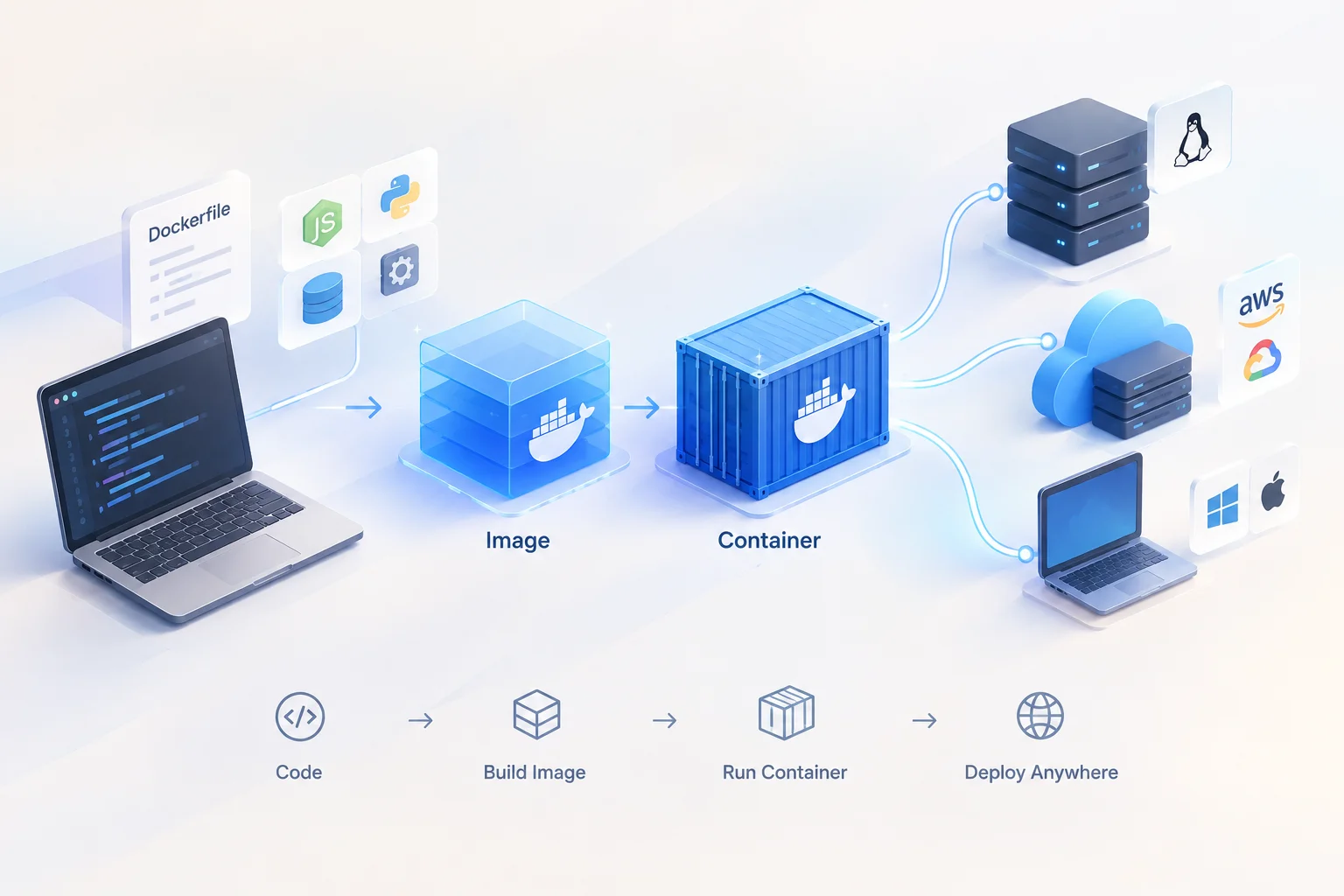
Every software developer has experienced this frustration at least once:
You write code on your laptop, test it, and everything works perfectly. You push it to a production server or share it with a teammate, and it immediately crashes.
"Well, it works on my machine!" you protest.
Why does this happen? Because your laptop has specific versions of Python, Node.js, database drivers, and operating system configurations installed. The target server might have slightly different versions—or be missing a dependency entirely.
To solve this nightmare, software engineers created Containers and tools like Docker.
The Real-World Analogy: Shipping Containers
Before the 1950s, transporting goods across oceans was chaos. Ships were loaded with loose barrels, wooden crates, and sacks of grain. Unloading required hours of manual labor, and goods often broke or got lost in transit.
Then came the standardized shipping container:
- A uniform steel box with standard dimensions.
- It doesn't matter what is inside (computers, bananas, or furniture).
- Ships, cranes, and trucks only need to know how to move the outer steel box.
Docker Containers do the exact same thing for software. They wrap your application code, dependencies, libraries, and configuration files into a single standardized unit that runs identically on any computer.
Containers vs. Virtual Machines
People often confuse containers with Virtual Machines (VMs). While both isolate software, they work quite differently under the hood:
VIRTUAL MACHINE                    DOCKER CONTAINER
+-------------------------+        +-------------------------+
|     App A  |  App B     |        |     App A  |  App B     |
+-------------------------+        +-------------------------+
|   Guest OS | Guest OS   |        |   Bins/Libs| Bins/Libs  |
+-------------------------+        +-------------------------+
|       Hypervisor        |        |      Docker Engine      |
+-------------------------+        +-------------------------+
|        Host OS          |        |        Host OS          |
+-------------------------+        +-------------------------+
|        Hardware         |        |        Hardware         |
+-------------------------+ +-------------------------+- Virtual Machines (Heavy): Each VM includes a full copy of an operating system (like Windows or Ubuntu) running on top of virtual hardware. VMs take minutes to boot and consume gigabytes of RAM.
- Containers (Lightweight): Containers share the host computer's operating system kernel. They only contain the application and its specific libraries. They boot in milliseconds and consume minimal memory.
The Core Building Blocks of Docker
Docker simplifies container management using three fundamental concepts:
1. The Dockerfile (The Recipe)
A Dockerfile is a simple text file containing step-by-step instructions on how to build your application environment:
# Start with a lightweight Linux image containing Node.js
FROM node:20-alpine

# Set the working directory inside the container
WORKDIR /app

# Copy dependency list and install them
COPY package.json .
RUN npm install

# Copy application code and start the server
COPY . .
CMD ["node", "server.js"]
2. The Docker Image (The Frozen Blueprint)
When you build a Dockerfile, Docker creates an Image. An image is a read-only, immutable snapshot containing your code and its exact dependencies. You can share images on public registries like Docker Hub.
3. The Docker Container (The Running Instance)
A Container is a running instance of a Docker image. You can start, stop, move, or delete containers with a single command without affecting your host operating system.
Why Containers Power Open Source and Cloud Computing
Containers transformed modern software engineering for three major reasons:
- Instant Environment Setup: Instead of spending hours installing databases and runtime dependencies, new team members can run
docker compose upand have a complete local development environment running in seconds. - Predictable Deployments: If an image runs in testing, it will run identically in production on AWS, Google Cloud, or a self-hosted server.
- Microservices Architecture: Applications can be broken down into small, isolated containers (e.g., frontend, API backend, database) that communicate over private virtual networks.
Packaging the Future of Software
Docker containers brought order to software shipping much like steel boxes revolutionized global trade. By decoupling application code from underlying infrastructure, containers ensure that code runs predictably anywhere in the world.