
Database Indexing Explained: How B-Trees Make Queries Instant
Ever wonder how databases find a single row among millions of records in milliseconds? Discover database indexing and how B-Trees make queries lightning fast.
Imagine walking into a massive library with 10 million books, but none of them are sorted on the shelves.
If you want to find a specific book by title, a librarian would have to walk down every single aisle, pick up every single book, and check the cover. Finding your book would take weeks.
To solve this, libraries use an index card catalog—an alphabetical directory pointing directly to the exact shelf and row where a book lives.
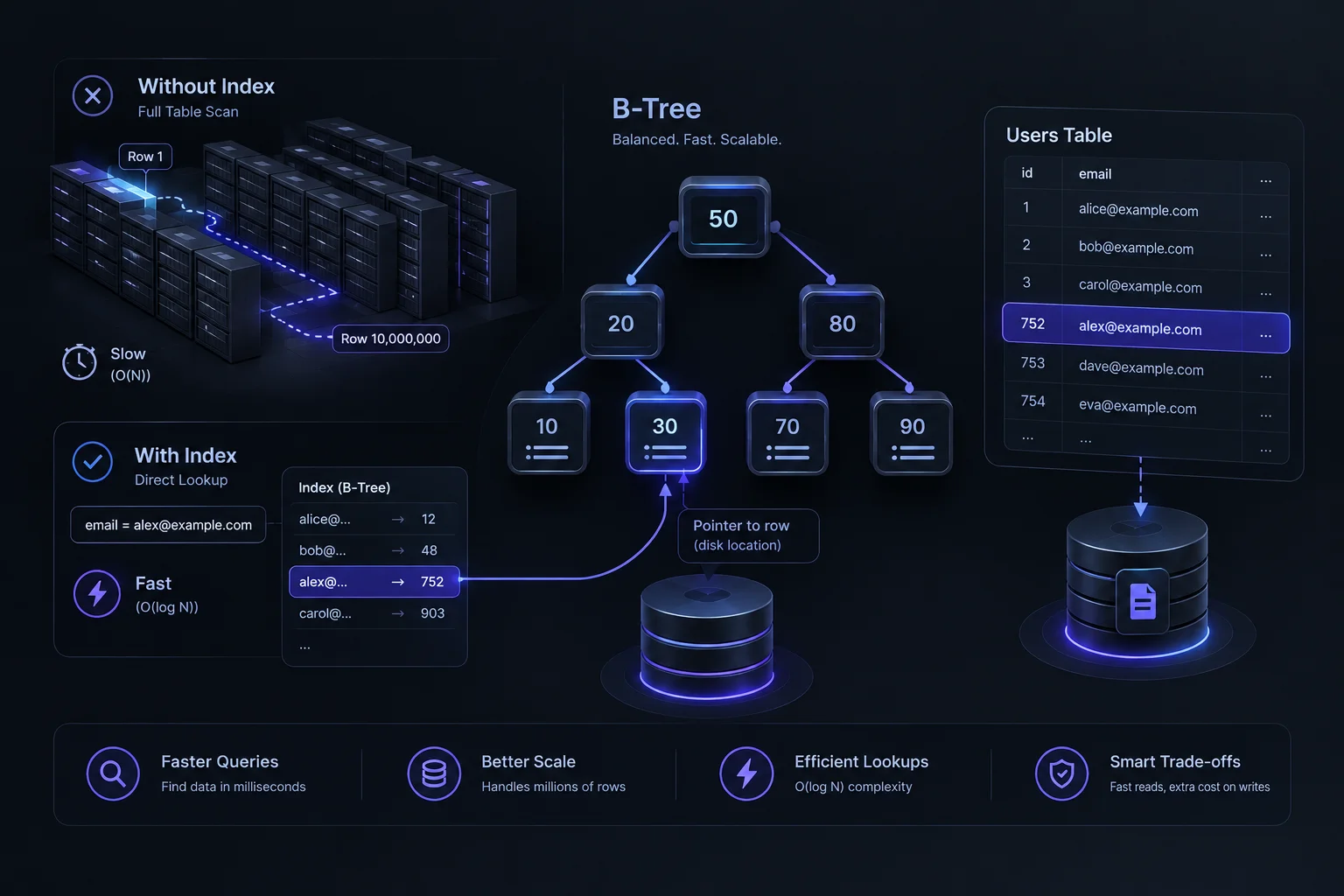
In software engineering, databases face the exact same challenge. Without an index, finding a single user record in a table with millions of rows requires a tedious Full Table Scan. With a proper index, the database finds that record in milliseconds.
The Problem: Full Table Scans
When you run a database query like this:
SELECT * FROM users WHERE email = 'alex@example.com';If the email column is not indexed, the database engine has no idea where that record is stored on the hard drive.
- It loads every single row from the disk into memory.
- It checks the email address of row 1, then row 2, then row 3... all the way to row 10,000,000.
- As your user base grows, your app slows down dramatically.
What Is a Database Index?
A database index is a separate, specialized data structure created alongside your table. It stores a sorted copy of specific columns (like email or id) paired with a direct pointer to the physical location of the actual row on disk.
Think of it like the index at the back of a textbook: instead of reading all 500 pages to find the word "Algorithms," you look up "Algorithms" in the back index and jump straight to page 412.
How B-Trees Work Under the Hood
Most relational databases (like PostgreSQL and MySQL) use a balanced tree structure called a B-Tree (Balanced Tree) to organize indexes.
Instead of a linear search (checking items one by one), a B-Tree uses a hierarchical directory structure:
- The Root Node: The database checks the top node (e.g., Is the value greater or less than 50?).
- Branch Nodes: It instantly narrows down which branch of the tree to follow.
- Leaf Nodes: It lands directly on the exact pointer to the disk row.
This reduces lookup time from Linear Time ($O(N)$) to Logarithmic Time ($O(\log N)$). Even if your table grows from 1,000 rows to 10,000,000 rows, finding a record takes only a few extra comparison steps instead of millions.
The Trade-Off: Why Not Index Every Column?
If indexes make lookups so fast, why don't developers add an index to every single column in a database?
Because indexes come with a cost during write operations:
- Slower Inserts & Updates: Every time you add a new row (
INSERT), update a value (UPDATE), or delete a record (DELETE), the database doesn't just change the table—it must also recalculate and rebalance every single B-Tree index attached to that table. - Storage Overhead: Indexes consume additional disk space and memory cache.
The Golden Rule: Index columns that you frequently search (WHERE), filter (JOIN), or sort (ORDER BY), but avoid over-indexing tables that experience heavy write traffic with few reads.
The Secret to Snappy App Performance
Database indexing is one of the most impactful performance optimizations in backend development. By understanding how B-Trees organize data behind the scenes, developers can transform sluggish queries into instant responses, keeping apps lightning-fast at scale.